
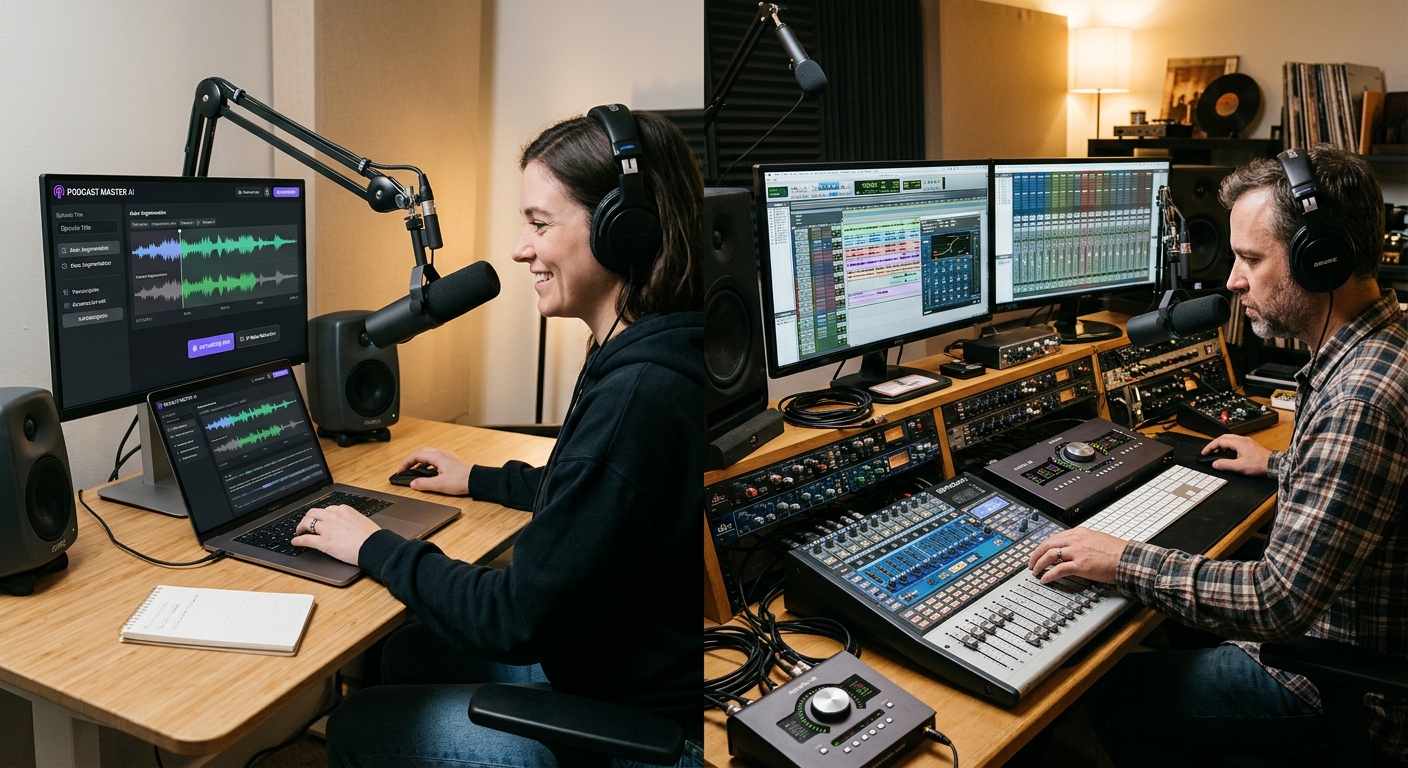
Podcast editing can take longer than recording the episode itself. Removing mistakes, cleaning background noise, balancing speakers, and arranging conversations all require time and attention. AI-powered podcast editing tools promise to reduce this work, while traditional digital audio workstations (DAWs) continue to offer detailed control over every part of a recording.
The comparison between AI-powered podcast editing tools vs traditional DAWs is not simply about which technology is newer. It is about how creators want to work, how much editing control they need, and what level of audio quality their production requires.
AI-based platforms such as Descript and Adobe Podcast make certain editing tasks easier through transcription, speech enhancement, and automated processing. Traditional DAWs such as REAPER and Pro Tools provide multitrack editing, detailed mixing, routing, and processing options.
Both approaches can produce useful results. The right choice depends on the recording, production goals, available skills, and the amount of manual control required.
Quick Answer
AI-powered podcast editing tools are generally more convenient for transcript-based editing, removing unwanted words, cleaning speech, and preparing episodes quickly. Traditional DAWs offer greater control over multitrack recordings, equalization, compression, routing, and detailed sound design. AI tools can simplify routine editing, but they do not automatically guarantee better audio. For many creators, combining AI-assisted cleanup with a DAW-based final mix provides a practical balance between production speed and sound control.
Key Takeaways
-
AI editing tools can reduce repetitive work through transcription, text-based editing, and automated speech enhancement.
-
Traditional DAWs provide detailed control over individual tracks, effects, mixing, and audio processing.
-
AI processing can sometimes change vocal tone or introduce unwanted artifacts.
-
Multitrack interviews and complex productions often benefit from a DAW-based workflow.
-
Creators do not have to choose one approach exclusively. AI tools and DAWs can work together.
1. What Are AI-Powered Podcast Editing Tools?
AI-powered podcast editing tools use machine learning and automated audio processing to handle tasks that traditionally required manual editing.
Depending on the platform, these tools can convert speech into text, identify unwanted words, reduce background noise, improve voice clarity, and help arrange recorded conversations. Some also provide recording, collaboration, and publishing features.
For example, Descript offers transcript-based editing. Instead of locating every unwanted phrase manually on an audio timeline, a creator can edit the transcript and remove the corresponding audio. Its Studio Sound feature is designed to reduce background noise and echo while improving speech clarity.
Adobe Podcast offers browser-based recording, editing, transcription, and speech enhancement. Its Studio interface allows creators to edit audio through a transcript, while Enhance Speech processes recordings to improve voice clarity.
These capabilities can make routine podcast production more accessible to people who have limited audio-editing experience.
Common AI editing capabilities
- Automatic transcription: Converts spoken words into editable text.
- Text-based editing: Allows creators to remove or rearrange spoken sections through a transcript.
- Filler-word detection: Helps identify repeated words and verbal pauses.
- Noise reduction: Reduces unwanted background sounds.
- Voice enhancement: Processes speech to improve clarity and balance.
- Automated clipping: Helps identify sections that may work as shorter content.
However, not every platform includes all these features. Creators should check the current feature list and subscription limits before choosing a service.
2. What Are Traditional Digital Audio Workstations?
A digital audio workstation, commonly called a DAW, is software used to record, edit, arrange, process, and mix audio.
Unlike a simplified editing interface, a traditional DAW normally provides a detailed timeline where users can work with individual audio tracks, clips, effects, and volume settings.
Examples include REAPER, Pro Tools, and Audacity. Their feature sets differ, but they provide more direct control over audio than a basic one-click enhancement tool.
A DAW is useful when a podcast contains several speakers, separate microphones, music, sound effects, or detailed production requirements.
What makes DAWs useful for podcast production?
Multitrack editing: Editors can keep each speaker, music track, and sound effect separate. This makes it easier to adjust one element without changing the others.
Equalization: Equalization, or EQ, adjusts different frequency ranges. An editor can use it to reduce unwanted low-frequency noise or improve speech clarity.
Compression: Compression controls the difference between louder and quieter audio passages. It can help maintain more consistent speech levels when applied carefully.
Noise and sound repair: Editors can use dedicated tools and compatible plugins to address problems such as hum, clicks, hiss, and room noise.
Detailed mixing: A DAW allows precise control over volume, panning, effects, and track routing.
For example, REAPER supports multitrack audio recording, editing, processing, mixing, and mastering. Pro Tools includes dedicated dialogue and voice-editing workflows, including searchable speech transcription and integrated noise-repair options.
These capabilities make traditional DAWs useful for creators who need more than basic cleanup.
3. AI Podcast Editing Tools vs Traditional DAWs: Main Differences
The biggest difference is how users interact with their recordings.
AI-powered platforms often focus on reducing manual effort. Traditional DAWs focus on giving editors direct control over the audio.
| Comparison Factor | AI Podcast Editing Tools | Traditional DAWs |
|---|---|---|
| Editing method | Often transcript-based or automated | Timeline and waveform editing |
| Learning curve | Usually easier for basic tasks | Can require more audio knowledge |
| Transcription | Often built in | May require a separate tool or plugin |
| Filler-word removal | Available in some platforms | Usually requires manual editing or additional tools |
| Noise reduction | Often automated | Manual processing and compatible plugins |
| Multitrack control | Depends on the platform | Usually extensive |
| Mixing flexibility | Varies by product | Detailed control over tracks and effects |
| Sound design | Often limited compared with specialist DAWs | More flexible |
| Best use | Routine editing and quick production | Detailed editing and complex sessions |
This table describes general differences, not fixed rules. Modern AI platforms are adding more multitrack features, while DAWs are also incorporating transcription and automated editing capabilities.
The distinction is becoming less about two completely separate types of software and more about different editing priorities.
4. Production Speed: Where AI Tools Have an Advantage
Speed is one of the main reasons creators consider AI-powered editing software.
A traditional editing session may involve listening through a complete recording, finding mistakes, selecting unwanted sections, and adjusting the timeline. If the episode contains several speakers, these tasks can take additional time.
AI-assisted editing can reduce some of that manual work.
Transcript-based editing
Descript’s text-based editing allows users to make changes through a transcript. Removing a sentence from the text also removes the corresponding audio section.
This approach can be useful for interview podcasts, educational discussions, and conversational episodes where spoken content is the main focus.
Adobe Podcast Studio also supports transcript-based editing. Its official product information describes a workflow in which users can edit audio by cutting, copying, and pasting transcript text.
Automated audio cleanup
AI speech enhancement can reduce the need for manual noise processing. Adobe Podcast’s Enhance Speech is designed to reduce background noise and echo and improve voice clarity.
However, processing time, file limits, and available controls depend on the service and subscription plan.
Where traditional DAWs take longer
A DAW may require users to understand tracks, clips, effects, and mixing settings. Editors who are unfamiliar with audio production can spend additional time learning the interface.
That does not mean a DAW is always slower. Once an experienced editor has a reusable project template and a familiar workflow, detailed editing can become efficient.
The main difference is that AI tools can automate certain decisions, while DAWs allow editors to make those decisions manually.
5. Audio Quality: Does AI Produce Better Podcast Sound?
A faster editing process does not automatically produce better audio.
Audio quality depends on several factors, including microphone quality, recording environment, speaker distance, background noise, room acoustics, and editing decisions.
AI enhancement can improve recordings that contain distracting noise or echo. It can also make speech easier to understand when the original recording is reasonably clear.
However, automated processing has limitations.
Potential problems with AI enhancement
AI systems may sometimes produce unnatural vocal tones, metallic-sounding speech, or unwanted changes to background ambience.
Results can also vary depending on the original recording. Adobe explains in its official FAQ that Enhance Speech results depend partly on speaker audibility and background noise. Clearer source recordings generally produce better results.
This is why creators should listen to the processed audio rather than assuming that a completed enhancement is automatically suitable for publication.
Why DAWs offer more control over sound
A traditional DAW gives editors more options to adjust individual elements.
For example, an editor can apply EQ to one speaker, reduce the volume of background music, adjust compression, and use different processing settings on separate tracks.
This is especially useful when two speakers have different microphone qualities or recording environments.
A DAW does not guarantee better sound either. Poor EQ, excessive compression, or aggressive noise reduction can damage a recording. The software provides control, but the editor still needs to make informed decisions.
6. Workflow Flexibility: Which Approach Suits Different Creators?
The best editing method depends on the type of podcast being produced.
Solo podcasts
A solo creator recording with one microphone may benefit from AI tools for transcription, speech cleanup, and removing unwanted sections.
A simple episode with limited background music may not require a complicated multitrack session.
Interview podcasts
Interview podcasts often contain separate speaker tracks, different microphone conditions, and occasional interruptions.
AI transcription can help locate important sections, while a DAW can provide more control over individual voices and sound levels.
Multi-host shows
Shows with several hosts may need more detailed editing. Each speaker can have different volume levels, microphone characteristics, and recording conditions.
A DAW can make it easier to adjust these elements separately. AI tools may still help with transcription and identifying sections that need attention.
Podcasts with music and sound effects
Productions with intros, outros, transitions, background music, and sound effects often benefit from a timeline-based workflow.
A traditional DAW provides detailed control over when each element starts, stops, and changes in volume.
7. Can Creators Combine AI Tools and Traditional DAWs?
Yes. A combined workflow can provide the advantages of both approaches.
Creators can use AI tools for tasks that are repetitive or time-consuming, then move the audio into a DAW for detailed editing and final mixing.
A practical workflow may look like this:
- Record the episode: Capture each speaker using suitable microphones and separate tracks where possible.
- Create a transcript: Use an AI transcription service to identify spoken content.
- Review unwanted sections: Find mistakes, repeated phrases, and unnecessary pauses.
- Enhance the speech: Apply noise reduction or voice enhancement where needed.
- Export the audio: Save the processed files in a suitable format for further editing.
- Open the project in a DAW: Arrange tracks, balance speakers, and add music or sound effects.
- Review the final mix: Listen through headphones and speakers before publishing.
This approach avoids treating AI and traditional editing as competing choices.
It also gives creators an opportunity to review automated changes before they become part of the final episode.
8. How to Choose the Right Podcast Editing Approach
Before selecting software, consider the type of content you produce and the problems you want to solve.
| Creator Requirement | Suitable Approach | Reason |
|---|---|---|
| Fast transcript editing | AI editing tool | Changes can be made through text |
| Basic voice cleanup | AI enhancement | Automates common speech-processing tasks |
| Detailed multitrack mixing | Traditional DAW | Offers direct track and effect control |
| Several speakers with different audio levels | DAW or combined workflow | Allows individual track adjustments |
| Music-heavy podcast production | Traditional DAW | Provides detailed arrangement and mixing |
| Beginner-friendly editing | AI editing platform | Can reduce the learning required for routine tasks |
| Professional post-production | DAW or hybrid workflow | Supports detailed editing and technical control |
Questions to ask before choosing
- Does the software support your recording format?
- Can it handle the number of speakers and tracks in your episodes?
- Are transcription and enhancement included in the subscription?
- Does the platform impose file-size or processing limits?
- Can you export audio in the format required by your publishing workflow?
- Do you need advanced mixing or mostly speech cleanup?
- Are you comfortable uploading recordings to a cloud service?
Privacy deserves attention, especially when podcasts contain private interviews, business discussions, or unpublished material. Read the provider’s data and retention policies before uploading sensitive recordings.
Practitioner Tip
Keep an untouched copy of every original recording before applying AI enhancement or making major edits. Compare the processed version with the source, particularly when speech sounds unnatural or background ambience changes. This gives you a reliable way to review automated processing and return to the original audio when necessary.
Conclusion
The comparison between AI-powered podcast editing tools vs traditional DAWs comes down to speed, control, and production requirements.
AI-powered platforms can simplify transcription, text-based editing, and routine voice cleanup. They are useful for creators who want to reduce repetitive work and produce straightforward episodes without spending too much time learning audio engineering.
Traditional DAWs remain valuable when a project requires detailed multitrack editing, precise mixing, sound design, and control over individual audio elements.
For many podcast creators, a combined workflow is the most practical option. AI can help prepare and clean the recording, while a DAW can handle the detailed editing and final mix. The best choice is the one that produces clear, natural audio without making the production process harder than it needs to be.
Frequently Asked Questions
1. Are AI-powered podcast editing tools better than traditional DAWs?
They are better for some tasks, but not every production need. AI tools can simplify transcription, speech enhancement, and text-based editing. Traditional DAWs provide more detailed control over tracks, effects, and mixing. The better option depends on the recording and the creator’s editing requirements.
2. Can AI tools remove background noise from podcasts?
Yes. Some AI-powered tools are designed to reduce background noise and echo in spoken recordings. However, results depend on the original audio. Very noisy recordings or unclear speech may still require manual editing or a different recording approach.
3. Do traditional DAWs require audio engineering experience?
Not always. Beginners can use basic editing features in applications such as Audacity. However, advanced mixing, routing, compression, and sound processing require additional knowledge. Learning these skills can provide more control over the final production.
4. Can Descript replace a traditional DAW?
Descript can handle many podcast editing tasks, including transcript-based editing, multitrack recording, and voice enhancement. However, creators who need specialized mixing, advanced routing, or detailed sound design may still prefer a traditional DAW for part of their workflow.
5. Is Adobe Podcast suitable for beginners?
Adobe Podcast offers browser-based recording, editing, transcription, and speech enhancement. Its interface can make common production tasks easier to approach. Beginners should still review processed audio and check current account limits before relying on it for regular production.
6. Should podcasters use AI enhancement on every recording?
No. AI enhancement is useful when a recording needs cleanup, but processing is not always necessary. A clean recording may sound more natural without additional enhancement. Creators should compare the original and processed versions before deciding which one to publish.
7. What is the best workflow for a small podcast team?
A small team can use AI tools for transcription, content review, and basic speech cleanup, then use a DAW for final mixing when needed. This division of work can reduce repetitive editing while preserving control over the published audio.